
AI Integrated Gmail
- My Role : UI/UX Designer
- Duration : 3 weeks | Personal Project
- Tools : Figma, Illustrator
- Methods : Domain Research, Qualitative Research, Quantitative research, Wireframing, High fidelity prototypes.
Problem Statement
Why I chose to redesign Gmail ?
As an active job seeker, I have come to rely heavily on Gmail in my daily life. In doing so, I have encountered the common problem of struggling to quickly and efficiently find specific emails among the overwhelming number of messages in my inbox.
As the world becomes increasingly digital, many people share this frustration of having inboxes filled with both important and unimportant emails, making it difficult to sort and organize them effectively. Even if you are able to find the important emails, you still have to individually read through them, as well as the countless unimportant emails, such as advertisements, coupons, and spam.
However, currently available email apps do not offer automatic management features to assist users with this problem. By adding this feature to Gmail, I believe it will greatly improve users' experience by making it easier and faster to manage their emails, ultimately increasing their use of the app and allowing them to focus on other aspects of their lives.
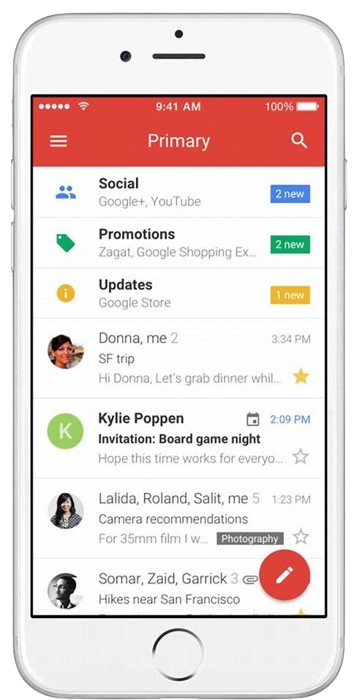
Overview of Redesign Process

Empathize
Qualitative Research
In order to gain a deeper understanding of the pain points faced by users in managing their emails, user reviews and feedbacks on the existing Gmail app were analyzed. This research method helped identify common issues such as difficulty in filtering and prioritizing emails, lack of customization options and an overwhelming amount of notifications. This information was crucial in informing the design choices for the feature being developed in this UX case study, as it allowed for a targeted approach to addressing specific pain points experienced by users. Additionally, this research helped to identify areas where the existing app fell short, providing an opportunity to create a solution that could meet the unmet needs of the users.

Harsh Goyal
Software Developer
38 Years Old
"I am a corporate worker who receives a number of emails from my workplace, hiring managers, bills, bank loans and insurance dues. I receive many of these mails and most are not worth looking at. Sometimes it gets stressful to manage the indecision over whether each email is worth checking or not. Also, once I found that I missed on an opportunity for a great job interview due to my unwillingness to go through my mail inbox which is filled with thousands of useless mails”

Sarah Nicolas
Entrepreneur
27 Years Old
"As a busy mom entrepreneur, I'm using email as a business tool for my small business. I have email accounts that let me communicate with customers and clients, wholesale vendors and supplier and arrange inventory. Unfortunately, there are too many less important emails that are either unnecessary or not in my priority list, which really adds to the mess on my screen. and since there's no way for me to filter out all these emails except by reading every single one of them carefully AND by deleting certain unsolicited emails, this process can take hours out of my day!”

David Rochsters
Retired Employee
62 Years Old
"I am a retired person who receives many emails about renewing the policy, invitations from social clubs, subscription dues etc. I have issues with my memory so its hard to keep track of all this emails I receive. due to my poor eyesight, I find it irritating when I have to go through tons of emails to see if I have any upcoming important event.”

Tom McKenna
College Student
19 Years Old
" I am a college student and I receive mails for subscription dues and coupons for clubs and restaurants, OTP mails, and many other forms of spam marketing emails. I often miss out on great offers and coupons because they expire before I manage to check my email, also, it is quite hard sometimes to find important college mails regarding assignment dues in the bulk of such other emails.”
Defining End User
The end user for this UX case study is professional individuals in the corporate or business realm, who face pain points related to high volume of urgent and spam emails. The design aims to address these pain points and provide value to a broader user group.
Qualitative Research
I decided to focus my efforts on addressing the most common problems and points of friction users are experiencing. To determine what those biggest pain points were and how I could address them in my new design, I spent the next hour and a half doing some primary research just by taking notes from articles and blogs that were already out there. Then few hours later when I finished jotting down everything important that I learned from just skimming through all of these news articles and blogs about email overload, Following are the findings from my research-
- An average person spends 28% of the work week reading and responding to mails
- An average inbox contains only 38% of important, relevant mails, this means 62% of the emails in an average mailbox are not important and can be processed in bulk
- Email interruptions are a drain in productivity- a study in danwood group found that it takes an average of 64 seconds to recover from an email interruption (regardless of the emails importance) and return to work rate as before the interruption
- Email overload increases stress levels – a team of researcher at UC Irvine and he US army studies the effect of email access on heart rate and ability to focus. The researchers found that limiting email access dramatically reduces stress levels
- Controlled notifications times and batch processing emails decreases stress and increases productivity
Competitive Analysis
Gmail, developed by Google, is a popular email service that is widely used by individuals and businesses worldwide. As a leading email provider, Gmail faces competition from several other email apps and services.
- One of the main competitors for Gmail is Microsoft Outlook. Outlook, developed by Microsoft, is primarily used by businesses and enterprise users. It offers features such as a calendar, task list, and contact management, which are not available in Gmail. However, Gmail has a larger user base and a more user-friendly interface compared to Outlook.
- Another major competitor for Gmail is Apple Mail, which is the default email app for iOS devices. Apple Mail has a similar user interface to Gmail and offers a clean and simple design. However, Gmail has more advanced features, such as the ability to add multiple email accounts and the option to use third-party email services.
- Yahoo Mail is another popular email service that also competes with Gmail. Yahoo Mail offers a similar set of features as Gmail, but it does not have the same level of integration with other Google services, such as Google Calendar and Google Drive.
- Lastly, there are many other email services like FastMail, ProtonMail, and Zoho Mail, which are also competing with Gmail. These email services are known for their privacy and security features, and they offer similar features as Gmail but with an emphasis on security.
In conclusion, Gmail faces competition from a variety of email apps and services, each with its own unique set of features and strengths. Gmail's main advantage is its integration with other Google services, its user-friendly interface, and its large user base. However, as the market becomes more competitive, Google will have to continue to innovate and improve the features of Gmail to maintain its dominance in the email market.
Possible Solution
Artificial Intelligence technology can be used to understand the content of each email, and classify them into different categories based on factors such as sender, recipient, and keywords to determine the importance of each email and prioritize them accordingly. This will provide a more organized and user-friendly email experience, allowing users to easily find and access important emails while reducing the time spent on sorting through irrelevant emails.
Define
Based on the above research and insights I decided to add following features in the app-
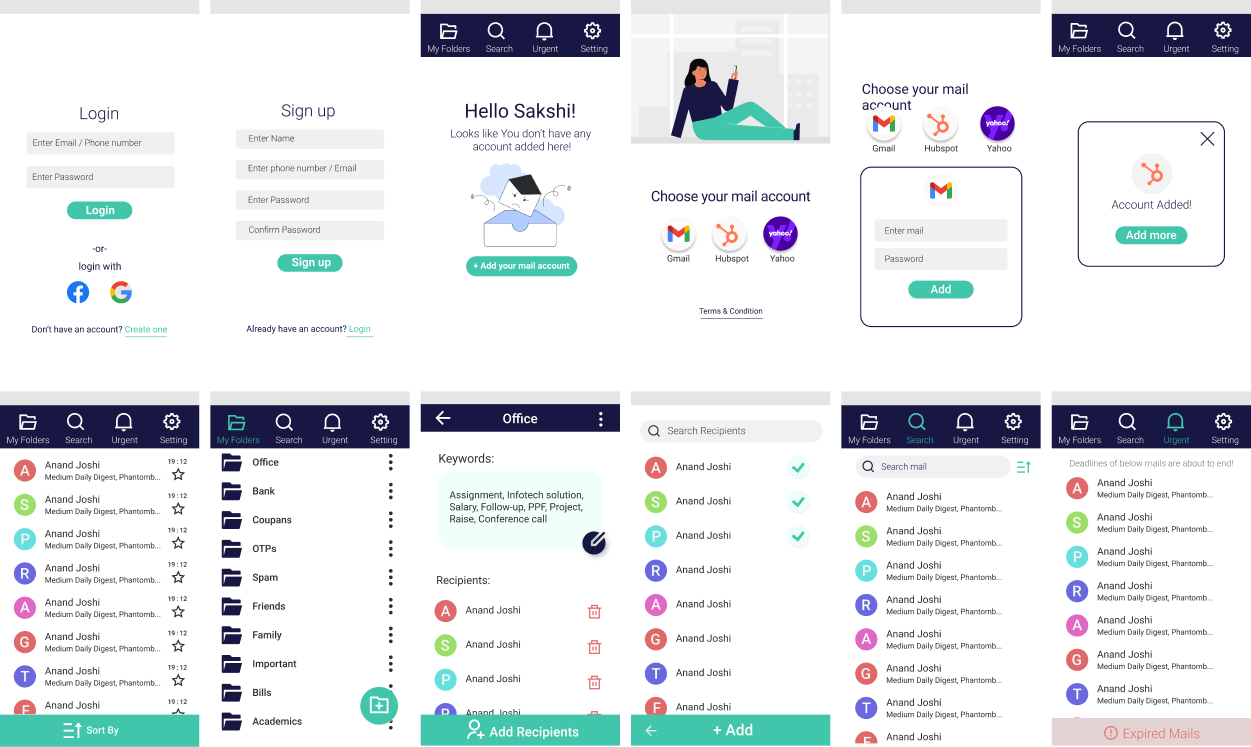
- Default category wise folders in inbox which automatically puts respective email in the specific folder
- Reads keywords or recipients from the mail and sort them accordingly to store in respective folder
- Recognizes deadlines from the mail and put those mails into urgent mail section according to their timeline
- Put expired deadline mails in the expired mails section
- Enables users to create their own folder by customizing recipients and keywords for that folder
- Controlled notifications time times for work mails notifications
- All the Basic email app features included (composing mails, marking important mails, searching mails directly from search bar, etc)
Ideation- Wireframing
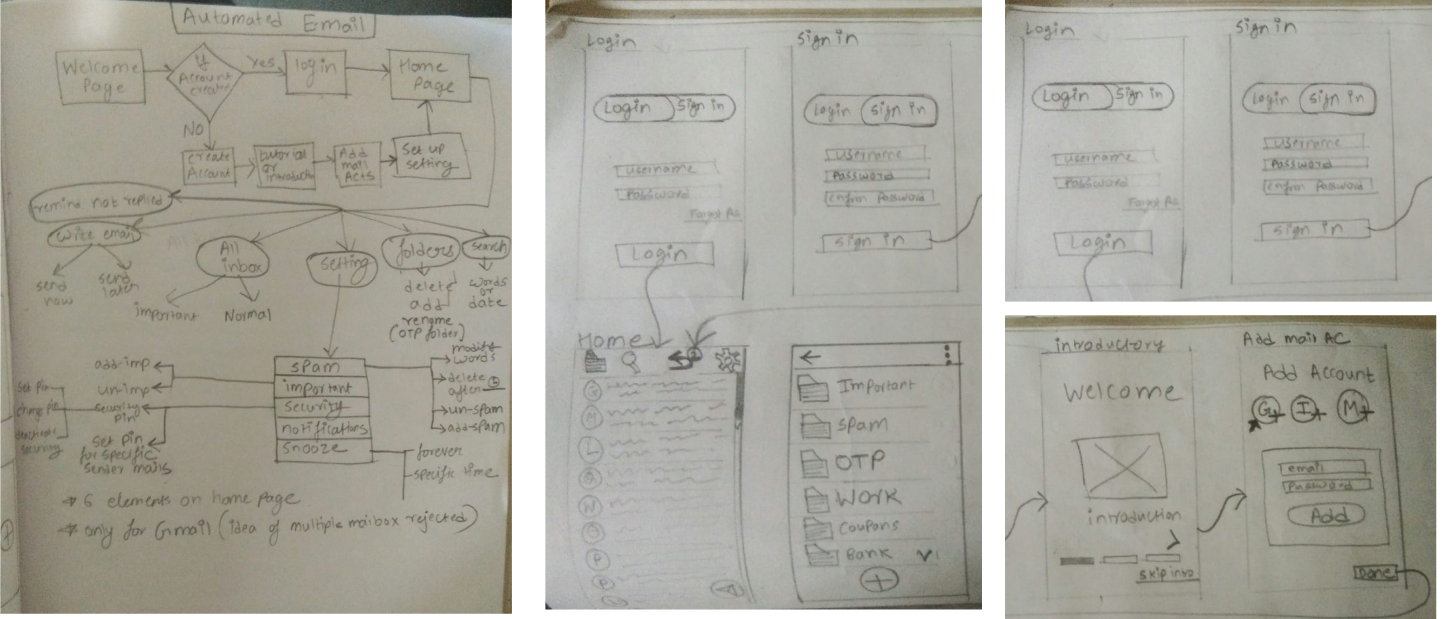
Creating user flow diagrams and rough sketches to implement identified solutions into a potential application interface for a case study.
Color Palette
In order to select right color palette for this interface, I considered the demographic characteristics of the target users, which were primarily mature adults. To enhance usability and facilitate ease of navigation, I employed a minimalist design approach and incorporated familiar design elements from widely-used email applications. To further establish a distinct brand identity and differentiate the application from its competitors, I carefully selected a color scheme that would effectively communicate the desired emotional associations. The primary color, Blue, was chosen to evoke feelings of trust and professionalism, while the secondary color, Aqua, was selected to provide a unique visual cue and to serve as an effective differentiation factor. Overall, these design choices aimed to improve the overall user experience and meet the needs of the target users

Prototyping
User Testing
After designing the prototype I tested it with some of my friends and family members, and made sure the concept is well understood by all age groups in order to make my designs inclusive. Below are the success story of personas.
Harsh Goyal
"“The app is the way to go for busy professionals that want to keep track of their job search and save valuable time by making it easier to sort through all the great opportunities. I can create separate folders and sort my mails in a way that helps me prioritize what requires an answer immediately vs. follow up later. This allows me to follow up with recruiters faster while catching anything I might’ve missed along the way. Seeing expired reminders ~like bills~ allows me to get them out of the endless sea of job offers mails”
Sarah Nicolas
“I find this helpful as now I can organize my customer mails as well as export-import and other vendor’s mails at one place without having to create and remember passwords of multiple mail accounts. This app is much more faster to use on daily basis as compared to any other mail app”
David Rochsters
“I have customized my own family folder, where it gets easier for me to prioritize reading those mails. I find urgent mails feature helpful as I suffer from amnesia and often forget events and therefore needed to check my e-mail constantly to make sure I don't miss anything, but this app has just made it simple"
Tom McKenna
“Since I have been using this app, I have been able to sort through all of my coupons and grab great deals before they expire, as well as delete any unnecessary Mails like expired OTP mails. Now that I use this automated mail app to keep up with emails from the university's faculty about upcoming deadlines for the assignments, it has allowed me to maintain a better academic standing since I receive notification when due dates are approaching”
Limitations on using AI
The AI assistant needs to be really strong as it has the potential to make mistakes, The AI which powers this app could mistake an email message for something else. For example, a system might read an important mail as an OTP mail, and put that mail automatically in OTP folder. Once this happens, the user is not likely to check the folder where your system will have mistakenly placed his/her important message. This may cause a serious loss.
Posiible Solution
While a user is about to delete any mail, we can warn the user that he or she should once go through all the mails before deleting it. We may also notify users on a monthly basis to go through all their automatically placed emails in order to report if they are put in the wrong folder by AI, which will help our AI to improve its algorithm further. Also, The main home screen looks and functions a lot like a classic email app. The inbox will hold all of your email, unsorted. This feature can only be an addition to enable you to find an important mail quickly or delete particular types of mails with just one check rather than scrolling through all of your mails.